Connecting Home IoT Devices
You can check and control the status of the connected Home IoT Devices.
- Install LG ThinQ app on your smartphone.
- Log in to your LG ThinQ account, and register your own LG ThinQ device.
-
Run Home Dashboard by pressing the
 button on the remote control.
-
Select the
 at the top right.
- Log in to your LG ThinQ account. A list of the registered LG ThinQ devices will appear.
If you are in an area where the LG ThinQ app is not in service, LG ThinQ device connection will not be supported.
To register your IoT device, select Connect Home IoT Devices and follow the instructions to apply settings.
If you are controlling the external device from your mobile app, you might not be able to control the device from your TV. Quit the mobile app to control it from your TV.
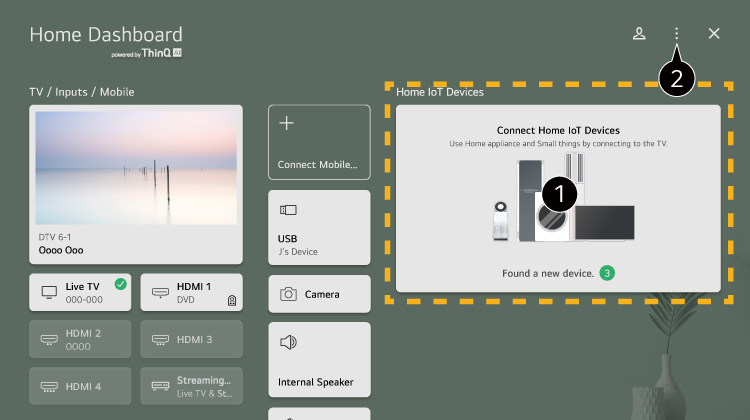
-
You can check the connection guide for each type of Home IoT Devices.
You can connect and see devices registered with your LG ThinQ account or IoT devices.
Once the device is connected, the card will be changed to a smaller size and appear at the bottom of the device connection list. -
Select
 Edit home IoT devices.
Edit List : You can hide or show the connected Home IoT Devices and rearrange the list.
Available settings vary depending on the model or region.
IoT devices that can be connected to a TV are subject to change without notice.
Connectable LG ThinQ devices and available functions may differ between mobile and TV.